


How to Raid on PC?

If we are going to install a simple Small Server, that is, a RAID supported Server on a normal PC, either our motherboard must have raid support or we need to buy a PCI Raid card. Before making Raid, there is usually an IDE-SATA-RAID option at the top of the Advanced menu on the Bios screen.
Raid
When you activate the RAID option here, you will be asked whether you want to enter the RAID configuration when your PC boots up. In general, you can enter the configuration panel with the <ctrl>+<l> key combination (Lüleburgaz). When you enter here, you must have at least two equivalent HDDs installed on your server so that you can Raid.
Raid logic is simple. You either mirror or merge, to put it in the simplest logic. Let’s examine a few of the raid types:
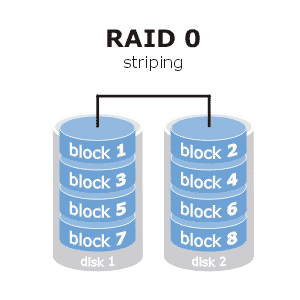
RAID 0 – Migrate
It means to merge. It combines at least two disks with each other. So if you have 2 1TB HDDs in your server, you will see it as a 2TB single disk thanks to RAID 0.
RAID 1 – Mirroring
It synchronizes at least two disks. That is, whatever is written to one disk is written to the other. Backup works according to logic. If one disk fails, data can be recovered from the other.
For example, if you still have 2TB disks and you connect them with Raid 1, you will use 1TB, but the disks will be exact copies of each other.
RAID 5
Raid 5 mirrors at least 5 disks to a single disk with a special technology. So if you have 6 1TB disks, when you connect these disks with Raid 5, you will have 5TB usage space and your 1TB disk will be a mirror disk. So if one of the other 5 disks fails, the data can be retrieved from this disk.
Usually PC motherboards do not support this. It can only be done on real servers. It is the most used Raid type today.
RAID 10 (1+0)
Raid 10 is a raid type that combines Raid1+Raid0 logic. That is, it combines disks in pairs and then mirrors each pair to each other. So if you have 4 1TB HDDs, you can use them as 2TB and mirrored when you connect them with Raid 10.
That’s all for now, friends. You can write your questions about Raid.



MAKE A COMMENT
COMMENTS - 0 COMMENTS