


Teknikom Voice Recording System Installation (VR-8, VR-4 and VR-2)

System Setup
Hello friends, in this article, I will explain how to install the Teknikom Voice Recording System. The technological development process on trust and reliability, which is one of the requirements of the century we live in, is growing rapidly every day. Of course, customer and user reliability is at the top of the list in this regard.
Show me a professional organization that does not make legal voice recordings in both domestic and international telephone conversations. Thanks to Voice recorder systems, one of the blessings of technology in this direction, retrospective voice recordings are shown as evidence, allowing you to easily get rid of possible problems that may arise.
Thanks to Teknikom Voice Recorders, which are widely used in Turkey, our needs in this regard are met. There are 3 most widely used models, VR-2, VR-4 and VR-8. It is possible to use these devices effectively in all areas of voice communication.
VR stands for Voice Recorder, which means Voice Recording. VRX is used to organize and archive audio data transferred from VR devices to our server via USB port.
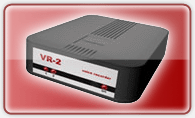

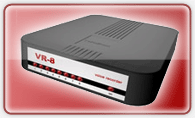
The VR device, which we connect to the computer or server via USB port, first listens to the telephone lines electrically. In other words, it monitors the voltage change or sound increases on the line and starts recording when the limits you set are reached. For example, the electrical voltage on a standard domestic telephone line is between 40-50 volts and is constant. However, when the handset is lifted, this voltage drops to 5-12 volts, at which point the VR device is activated and starts recording.
Once the recording starts, the recording continues until the voltage returns to standard and ends when the voltage returns to normal. The resulting analog audio recording is converted into digital format by the audio codec and transferred to our server via USB port and stored there.
The digital file coming from the USB port is saved to the hard disk with the special archiving algorithm of the VRX software. While VRX software saves the sound to disk, it also saves the information of the file to the MS access database file with *.mdb extension. This database then allows you to easily access the file at any time.
One of the most attractive aspects of the system is that the configuration is kept on the device, not on the server. In other words, as soon as you install the VRX program in processes such as transfer and reinstallation, it asks you to connect the VR device and automatically pulls the entire configuration from the device as soon as you connect the device. However, it keeps the audio data and database file on the hard disk.
So as long as your server is off, it cannot record. You can tell if the VR device is recording or not by the red“On” light in front of it. If the led is on continuously, it is recording. If it blinks, it means it is not recording.
Here is a view from the VRX Program:

Simple VR devices consist of three models with 8 lines, 4 lines and 2 lines capacity. If you want, you can also record radio or announcements with the air recorder device.
The most important thing to consider when installing Teknikom VRX software on your server is that you have a usable Sound card and that this sound card is introduced to the operating system. Especially when setting up a server, we can ignore introducing the sound card and therefore the VRX program gives an error. Also audio recording is not possible. However, this problem disappears when you introduce your sound card.
I recommend that you do not start the installation without reviewing the installation guide from Teknikom’s website. Currently, thanks to this system, I can successfully record audio from a total of 34 channels, 30 of which are internal lines, 2 of which are external lines and 2 of which are radio lines, on my Windows 2008 Server.
With Teknikom’s technical and telephone support, you can easily integrate this system into your own switchboard.


MAKE A COMMENT
COMMENTS - 0 COMMENTS