


How to Install Ram in Your Computer?

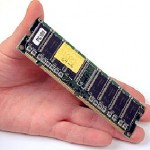
Is your computer performing poorly when you surf the web, work with your programs or play your favorite game? You don’t need to buy a new PC right away. If your computer’s motherboard has empty slots for RAM expansion slots, you can do a RAM upgrade. For this, first of all, the speed of the RAMs you have is important. However, before going into technical details, let’s first get to know what Ram is and what it looks like.
It is a lightweight piece with memory chips arranged on a green silicone base that the friend on the left is holding in his palm. It is divided into technological classes as DDR, DDR2, DDR3 or even SDR and even EDO Ram if we go back further. You can determine the type of Ram by looking at the gaps between the gold-plated sockets entering the slot and you can easily read the label. According to the historical development, the capacity of RAMs is 8Mb, 16Mb, 32Mb, 64Mb, 256Mb, 512Mb, 1Gb and today it is available as 2Gb in one piece. In other words, the memory capacity of the Ram that you can install in your computer as a single piece can be maximum 2Gb.
In the picture below, the location of the Ram slots on your motherboard is described as areas 1 and 2. It is more or less similar to this on every brand motherboard.

One point you should pay attention to when buying a ram is the speed of the ram. While the chip speed in DDR type ram is max 400 MHz, there are 533, 666 800 MHz models in DDR2 type. In DDR3, 1033 and 1333 MHz models are available. However, the first of the two issues you will pay attention to when buying Ram is the type of Ram supported by your motherboard, and the second is the type of ram that is already installed on it. Because its speed in MHz and memory capacity is important. For example, if your computer has 1 Gb DDR 400 Mhz ram, the speed of the ram you will get should be 400 Mhz and the type should be DDR. Since 2 gb DDR ram is not produced, the maximum capacity of the only piece of ram you can buy in DDR type can be 1 Gb. You can buy as much ram as the slot of your motherboard (provided that it is the same type) and you can increase the ram.
Finally, let’s show you how to install Ram on the motherboard with a video.


MAKE A COMMENT
COMMENTS - 0 COMMENTS